
Saturday, 24 October, 2026
Moving this blog to AWS, part one: a client-grade platform
I set myself a brief: move this blog to AWS and build it the way I would for a paying client. Containers, a load balancer, Terraform, and the catch that made me pull the plug.
Moving this blog to AWS, part one: a client-grade platform
Part one of two: building the blog's AWS home the way I would for a paying client.
For years this blog, built on the Umbraco content management system (CMS), lived happily on a small DigitalOcean server costing $7 (about £5.50) a month. Nothing was wrong with it. But I wanted to bring my Amazon Web Services (AWS) skills up to date, and the best way to learn is to build.
So I set myself a brief: move the blog to AWS, and build it the way I would for a paying client. A client running a business-critical website expects resilience, automation and room to grow, so that's what I built.
Containers, the Kubernetes way
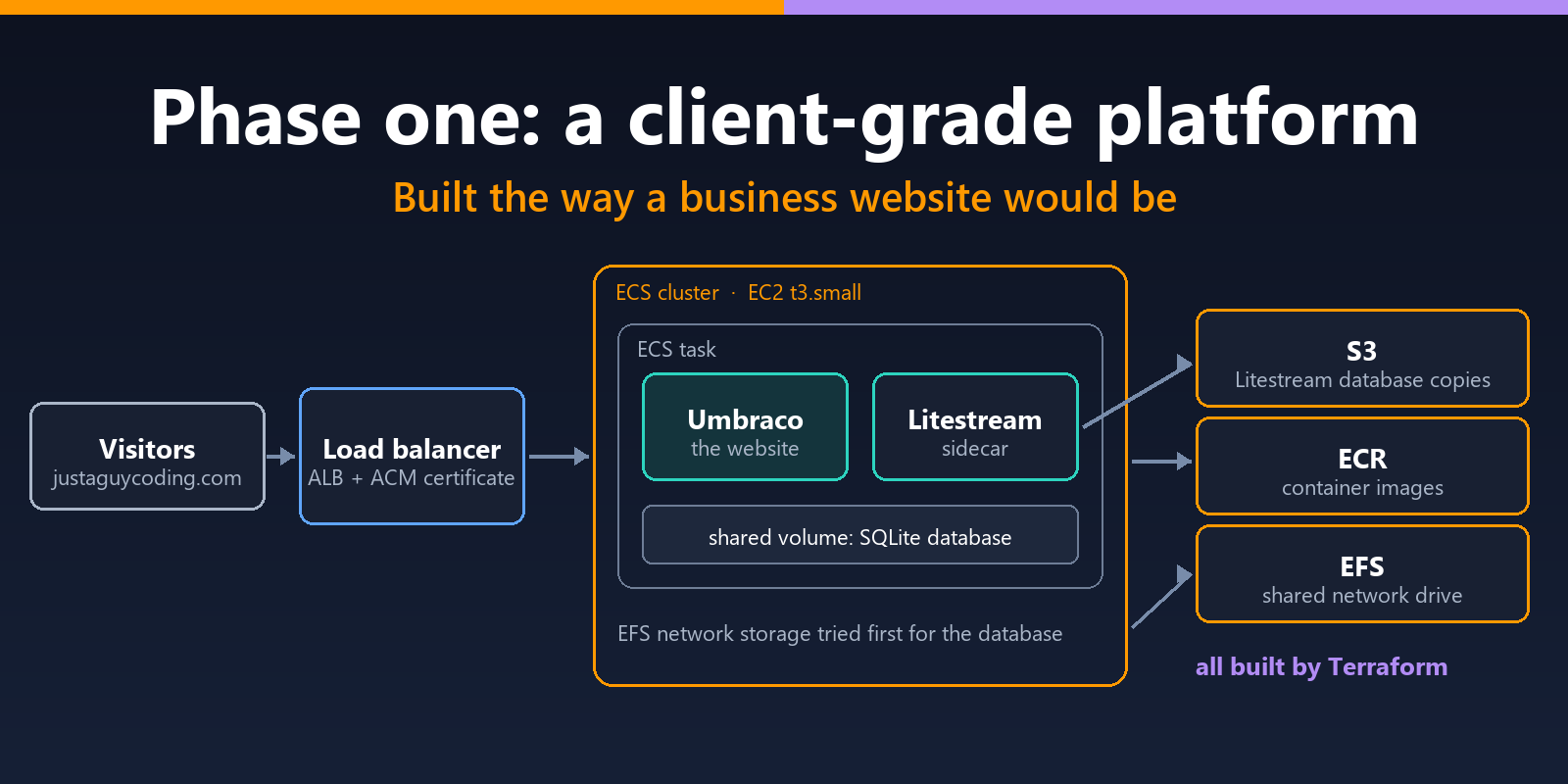
The site was packaged into Docker containers: self-contained bundles holding an application and everything it needs to run. Those containers ran on Amazon Elastic Container Service (ECS), which starts them, stops them and restarts them if they fail.
ECS can run containers in two ways. With Fargate, AWS provides and manages the servers out of sight: you hand over a container and it simply runs. With the EC2 option, the containers run on a pool of Elastic Compute Cloud (EC2) virtual machines that you provide and look after yourself, choosing their size, keeping them patched and making sure there's room for every container.
I chose EC2 deliberately, because it works the way Kubernetes does. Kubernetes, the industry-standard system for running containers at scale, also spreads its workload across a group of servers, called nodes, that someone has to run and maintain. Even the vocabulary lines up: ECS's clusters, tasks and services correspond to Kubernetes' clusters, pods and deployments. Learning ECS the hands-on way meant the skills would carry straight across.
The front door
In front sat an Application Load Balancer (ALB), which received every visitor and passed them to a healthy copy of the site. The HTTPS certificates that put the padlock in your browser came from AWS Certificate Manager (ACM).
Keeping the data safe
The blog's database is SQLite, a compact database that lives in a single file. Alongside the website ran Litestream, a "sidecar" helper container. Its job was to copy every database change to Amazon S3 (Simple Storage Service), AWS's file storage. If a server ever had to be replaced, the new one could pick up exactly where the old one left off.
Built in code
Everything was built with Terraform from day one. Terraform lets you describe your infrastructure in code: you write down what you want, and it builds it. Here that meant:
- the private network, a Virtual Private Cloud (VPC), and its subnets
- the firewall rules
- every permission
Terraform also keeps a record of everything it has built, called its state. I kept that in S3, with a table in Amazon's DynamoDB database acting as a lock, so two people couldn't make changes at the same time. It's how a development team would set things up.
| The platform at a glance | |
|---|---|
| Containers | ECS on an EC2 t3.small server (2GB of memory); container images kept in Amazon's Elastic Container Registry (ECR) |
| Traffic and HTTPS | Application Load Balancer, with certificates from AWS Certificate Manager |
| Database | SQLite, first on a shared network drive, then on the server's own disk |
| Backups | Litestream, copying every change to S3 |
| Infrastructure | Terraform, with its state in S3 and a DynamoDB lock |
| Cost | Around $40 (about £30) a month |
Going live
In July 2026 I pointed the domain at the load balancer, and the blog went live on AWS. Running it live put the design to a real test, and taught me a great deal.
The database catch
SQLite and network drives don't mix. My first plan kept the database on Amazon's Elastic File System (EFS), a network drive that several servers can share. EFS uses NFS (Network File System), the standard way of sharing a drive between computers. But SQLite relies on file locking to stop two writers corrupting its file, and that locking doesn't work reliably over NFS. Every start-up failed until I moved the database onto the server's own disk.
That fixed the problem, but at a price. A database on one server's own disk can't be shared, so the site could no longer scale out across several servers, which is half the point of a load balancer. Doing that properly would mean a full database server. Umbraco works with only two databases, SQLite and Microsoft SQL Server, so that meant SQL Server on Amazon's Relational Database Service (RDS), which can run several database engines, SQL Server among them. That would add £20 or more a month.
Doing the sums
The load balancer alone cost around $20 (£15) a month before the site served a single page, and the whole platform came to roughly $40 (£30), with a database server still needed before it could truly scale. I was paying for, and maintaining, resilience built for a busy business website, when what I actually had was a lightweight personal blog with one author.
So I pulled the plug. Because every piece was defined in Terraform, one command tore the whole lot down, leaving nothing behind quietly running up a bill.
Looking back on phase one
Phase one did exactly what I set out to do, but it was a mistake in terms of architecture and infrastructure for this blog, and that needed to be put right.
Hands-on with the real thing. I built and ran, under live traffic, the AWS services a client would expect: a private network, container clusters, a load balancer, managed certificates, shared storage and fine-grained permissions.
The design was tested. Running it live exposed the database catch, which no diagram would have shown me.
Terraform made walking away painless. When the sums didn't add up for a personal blog, the whole platform came down in one step, with nothing left behind.
A client's architecture comes with a client's bills, and a one-author blog doesn't need either, so I wanted to start again with a clean sheet and a different question: not "what would a client expect?", but "what does this blog actually need?" The answer, and how it runs today for a little over half the cost, is in part two.
 Copyright @ 2010-2026